Canvas Showcase Roundup
December 18th was the second annual GSA Canvas Showcase! Members of the GSA staff community shared mince pies and a wide array of insights into some of the innovative ways in which Canvas is being used across the institution.
The topics under discussion included:
- The ways in which Canvas has streamlined the
process of student sign-ups and enrolments for elective courses;
- The lessons learned from inviting students to
submit images for display in the Design Domain course;
- Some of the features of the Cross School course,
including the embedding of Padlet images galleries, and the use of sections to
assist with the functioning of the Attendance tool;
- The new Virtual Classroom tool (Collaborate), with a demonstration
of using it for remote teaching at Forres. Collaborate allows distant learning that remains live,
interactive, and face-to-face;
- Using Canvas as a launchpad into other social media and web spaces;
- The value of academic reading lists, which can
be processed by the GSA Library and embedded in your Canvas courses, giving students instant access to the reading materials for a course;
- The use of Canvas Discussions as a tool for students to
video, share, and provide feedback on group presentations, and the ways in
which this tool has enhanced critical student engagement.
Below are brief recaps of each session.
Session 1 Student self enrolment, groups in DHT

Elaine Boyle and Patrick Collins, Design History and Theory - Student self-sign up groups
Session 2
Thea Stevens, Virtual Studios – online gallery slideshow for Design Domain (lessons learned)
 For the course assessment, students each submitted 1 image and descriptive text. Images were submitted via the assignments tool. Thea wanted to display the student work as an online gallery, and she spent 40 hours downloading, organising, and re-uploaded the student images onto canvas pages which were filtered by programme. The resulting slideshow of images looks fantastic, but the process was far too labour intensive. The Design Domain Course moved to an earlier point in the academic calendar this year, and it was challenging to make best use of Canvas with the tight timeframe. With more time, Thea feels she would have been able to investigate other options for an online gallery; a more effective process is needed for displaying student work in Canvas in the future. One option is the use of the Planet eStream photoset.
Session 3
Katy West, Cross Schools Course - embedding Padlet for a student gallery; group assignments; roll call attendance

This is the second year of using Canvas for this large scale course, and Katy notes that she is starting to design within Canvas instead of outside of it - i.e. the nature of Canvas is driving some of the ways the material is delivered to the students, and how the assessments are communicated, etc. This makes for a better marriage of tool and instructional design.
To assist with communication and admin, Cross Schools Course students are divided into both groups and sections within Canvas. Using sections allows attendance to be taken, and section specific announcements can be sent. Using Canvas Groups means that students can be assigned a group assignment. Groups and Sections can be generated from Learning Technology for large scale courses such as this one, though usually they are made manually by the instructor.
Katy wanted the students to introduce themselves via a message board of some kind, and she used the free tool Padlet for this. Padlet embeds very easily into Canvas, and it serves as an online gallery in many of the ways that Thea Stevens was also exploring; a Padlet has the big advantage of allowing students to add and manage their own images, videos and text, so administration is minimal.
Session 4
Mafalda Moreira, Innovation – Using Blackboard Collaborate with Forres elective students
 Mafalda was one of the first tutors to try out the new Virtual Classroom tool - Blackboard Collaborate - which GSA purchased over the summer. Mafalda used the tool to communicate with her students up at Forres, where she is was delivering an elective. The students found the tool easy to use, easy to find (it embeds into Canvas and has it's own item in the navigation menu) and of great use. Mafalda thinks Collaborate has terrific potential for use in tutorials, not just for distance learning but for students here at GSA as well who may prefer or need to have a tutorial online rather than in person for a variety of reasons. Mafalda's students were very positive about this tool, which is available for any tutor to add to their Canvas course and start using.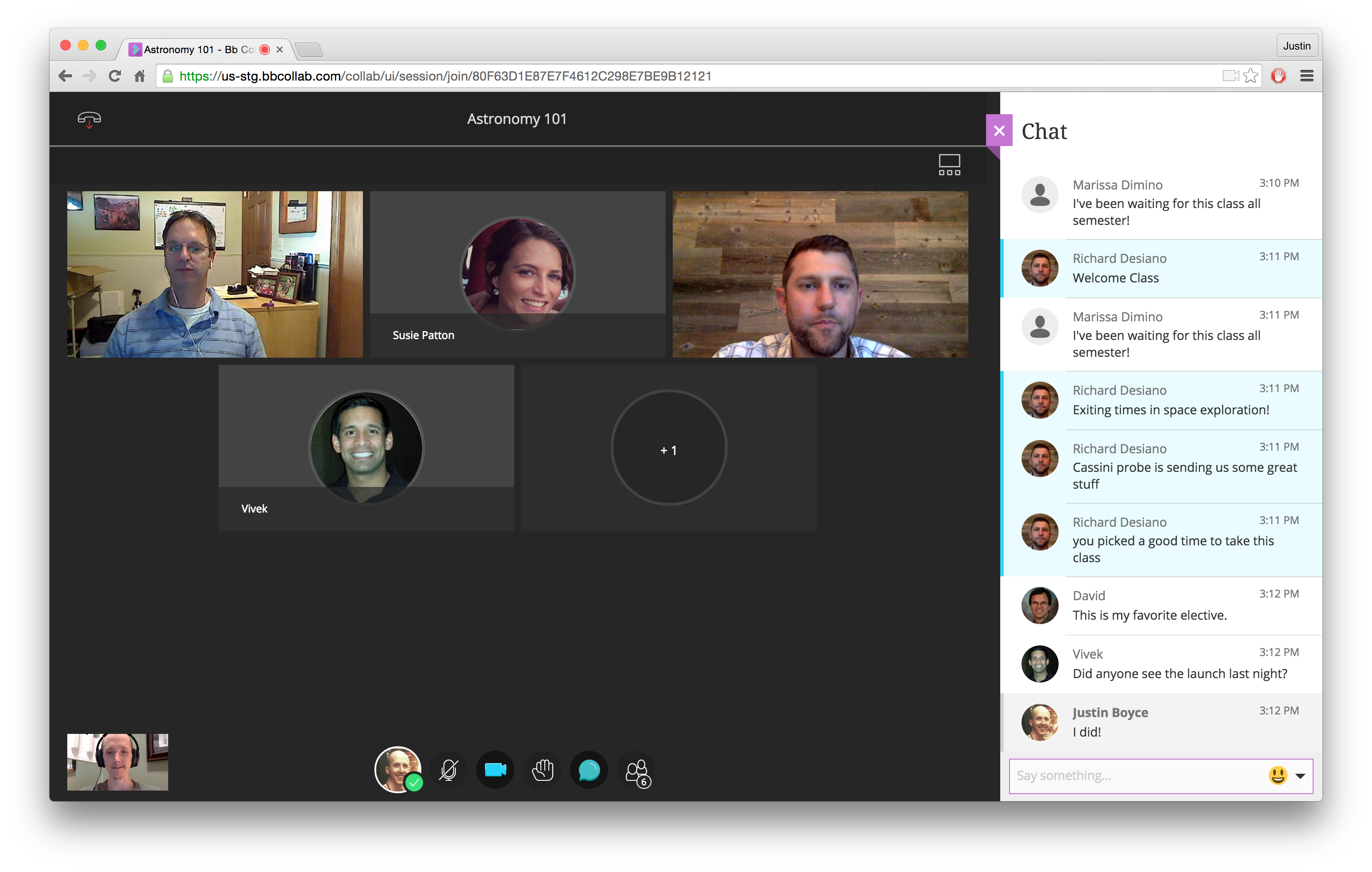
Session 5
Kathy Li, Architecture - Vertical Project, including embedding Wordpress site; Stage 1 home page with images used as a navigation menu
 All architecture participated in the Vertical Project course in the first few weeks of Semester 1. Students were divided into groups and their assessed piece of work was to create a 2 minute film, and document their work on Wordpress and Instagram. Canvas was used to provide a launchpad to various social media tools, with links to Instagram, Vimeo, Eventbrite, and Wordpress as well as being a repository for the briefs and resources. (Vimeo films and Wordpress sites embed very easily into Canvas). Kathy also showed the graphical navigation menu which architecture uses as an alternative to the Canvas side course menu, to make it easier for students to find content in a big course. Each of the images below link to a module.
Session 6
Isobel Lutz Smith, Learning Resources - Reading Lists on Canvas
 Isobel described the CLA requirements that need to be met in terms of scanning, which sounds really dull but had a positive point: the library is here to do all the scanning and ordering of books for you! All a tutor needs to do is send Isobel their reading list, and voila! As if by magic, the material will be scanned and the reading list will be built into Canvas, giving the students easy access to their material and saving the tutor from having to direct students to the handbook or other location to find the readings. Isobel also reminded everyone that tutors scanning their own material for the students to access is illegal and could result in fines for GSA.
Session 7
Libby Anson, PGT electives- Students using Discussion Forum to video, share, and comment on group presentations


_____________________________
Thank you to all the presenters for sharing their great work!
If you would like to learn more about any of the topics from the Showcase, please contact Correy c.murphy@gsa.ac.uk or Michael m.barr@gsa.ac.uk. We're always happy to help you with your Canvas adventure.
Comments
Post a Comment